Capital.com
REST/WebSocket-oriented public API with separate demo use and session authentication concepts. Read the current official limits and account requirements before building.
Capital.com bot guide →A broker API is an execution/data interface, not your whole architecture. Put broker-specific authentication, symbols and order formats behind a small adapter.
Before writing strategy code, check whether the platform offers demo/paper access, what authentication it uses, whether it has streaming data, how orders are confirmed, what rate limits apply and which features are available to your account.
Market data and login may succeed while an order is rejected by account permissions, minimum size, risk checks or broker-side state. Verify every layer separately.
strategy.place_order(symbol, side, size)
             ↓
     internal broker interface
             ↓
Capital adapter / IBKR adapter / OANDA adapter / ...
             ↓
platform-specific request + response
This prevents session tokens, broker symbol names and response shapes from leaking through every strategy function.
REST/WebSocket-oriented public API with separate demo use and session authentication concepts. Read the current official limits and account requirements before building.
Capital.com bot guide →Multiple developer interfaces including Web API and TWS API. Architecture differs depending on which interface you choose.
Official API portal ↗REST-oriented v20 API resources for account, order, trade, position, transaction and pricing workflows.
Official developer docs ↗REST trading API and related developer documentation. Test the complete deal-confirmation lifecycle rather than assuming a request equals execution.
Official IG Labs docs ↗OpenAPI resources including request/response and streaming concepts. Features and permissions depend on environment and account.
Official developer portal ↗Normalize price, position and execution interfaces so the rest of the bot depends on your own internal contract.
Broker adapter guide →No. Authentication, symbols, streaming, order fields, confirmations, environments and rate limits vary significantly.
It lets you prove authentication, request formats, symbol mapping and order lifecycle without treating untested integration code as production-ready.
Keep broker-specific response shapes and credentials out of strategy logic. Translate them at the boundary into your own internal model.
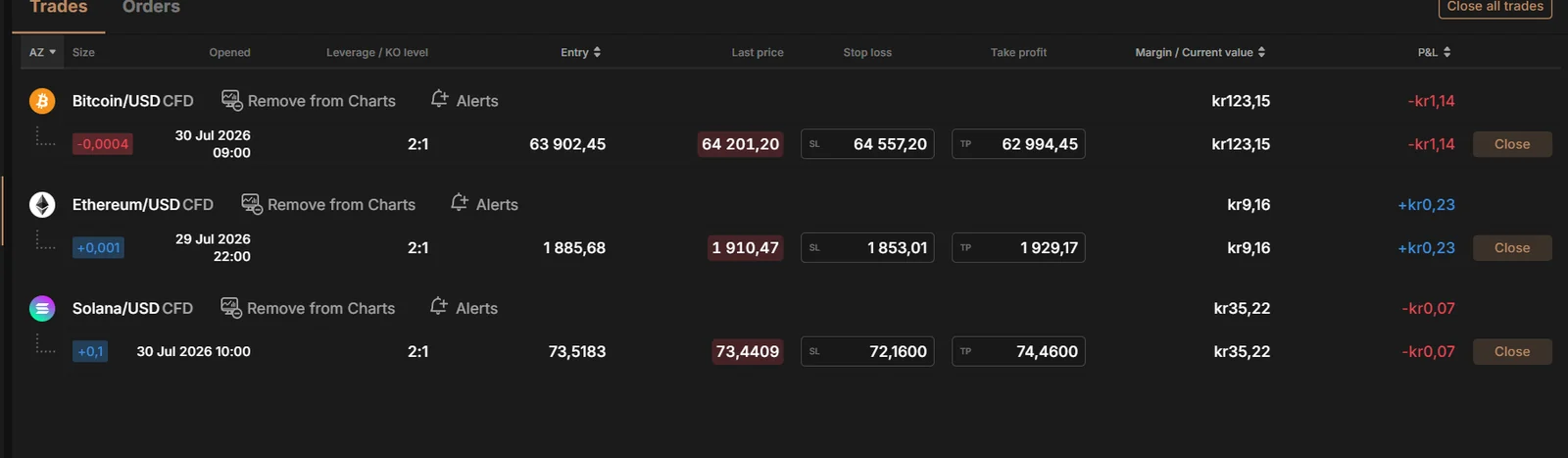
The broker interface showed the resulting BTC, ETH and SOL positions together with entry price, stop loss, take profit and current P&L. A robust bot should reconcile against this final state after requests, timeouts and retries.